


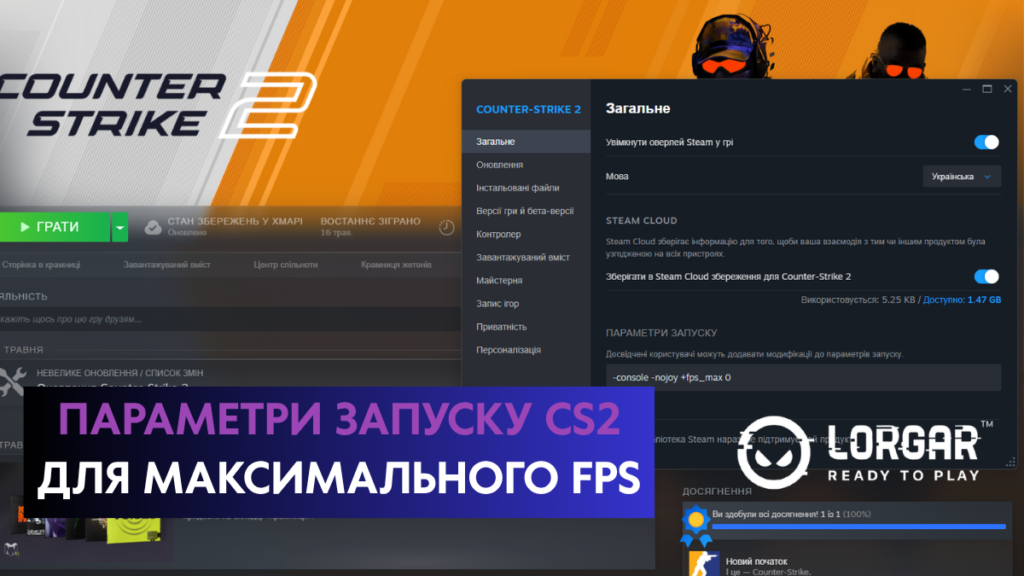
Launch options are applied when opening Counter-Strike 2. Thanks to them, you can perform various actions that optimize the game startup and allow you to increase frame rate (FPS). In particular, you can configure the client refresh rate, set FPS limits, specify an autoexec file, and adjust technical parameters.
We have prepared a small guide on CS2 launch options so you can get the maximum performance from the game.
Where to Configure CS2 Launch Options
You need to open Steam and go to the “Library” tab. Then select Counter-Strike 2 from your list of games. After that, right-click on “Counter-Strike 2” and choose “Properties.”
A separate window with CS2 settings will open. Go to the “General” tab, where you will see the “Launch Options” field. This is where you need to enter the required commands.
In the “Launch Options” field, enter the commands you need separated by spaces, for example: -console -nojoy +fps_max 400 +engine_low_latency_sleep_after_client_tick true. After that, simply close the window, and Steam will automatically apply the specified parameters to the game the next time you launch CS2.
It is important to note that after adding commands, CS2 may launch unstably. Most often, this is related to incorrectly written launch options. Here is what you need to know when adding launch options:
Commands must be written in a single line and separated by spaces.
- All parameters begin with – or +.
- Do not put launch options in quotation marks.
- Remove brackets, commas, and other unnecessary symbols from the field.
- In the “Launch Options” field, use only letters, numbers, spaces, +, –, and _.
Commands for CS2 max FPS
The most popular commands for launching CS2 are those responsible for game optimization.
- +fps_max [value] – responsible for limiting FPS, but if you set the value to 0, the game will output the maximum possible number of frames. If the game works unstably and freezes when set to 0, then replace the value with a fixed limit. It is recommended to choose a value that is 10 FPS higher than your monitor refresh rate, for example +fps_max 70 for 60 Hz. When your average FPS is higher than the monitor refresh rate, it is better to choose a value approximately 10 FPS lower than your stable average FPS.
- -refresh [value] – sets the monitor refresh rate that CS2 will use during launch. This is useful when the game constantly launches with the wrong Hz frequency.
- -console – immediately enables the developer console, which will save you time searching for the corresponding settings to enable it.
- -nojoy – disables joystick support and turns off unnecessary background processes related to gamepads. This helps reduce background load on your PC.
Launch Options for Improving FPS
Here we have highlighted additional commands that can increase frame rate as well as stabilize it to avoid major FPS drops. However, these parameters do not always work correctly on all PCs, so it is better to test them individually before using them permanently.
- -vulkan – thanks to this command, CS2 launches through the Vulkan API instead of DirectX 11. This is a good option for increasing FPS on some AMD graphics cards, older Intel Arc cards, and weaker CPU configurations. It is important to remember that on NVIDIA graphics cards, this parameter, on the contrary, reduces frame rates and may lead to long loading times.
- -threads [number] – after entering this command, CS2 will use a specific number of CPU threads. When using it, players usually set the number of threads plus one, for example -threads 9 for a configuration with 8 threads. However, in some cases this may negatively affect game performance, especially when it comes to Intel processors with hybrid architecture.
- +engine_low_latency_sleep_after_client_tick true – this command will not increase FPS, but it will make the game feel more “responsive.” The parameter helps synchronize your actions better and reduces Input Lag. However, it is better to use it with an FPS limit enabled, because with the command +fps_max 0 it may instead lead to lower frame rates.
- -high – this command increases the priority of the CS2 process, causing your computer to allocate more resources specifically to CS2. This may lead to problems with overall PC performance, so it is better to test how this launch option affects your system. If problems occur, it is best to avoid using it.
- +r_drawparticles 0 – disables particle animations, which improves performance.
- -softparticlesdefaultoff – helps improve performance by disabling the blending of particle effects with the background, which reduces GPU load.
Launch Options You Should Avoid
On the Internet, you can also come across lists of CS2 launch options that contain commands which are no longer relevant. Most often, these are commands that were useful for CS:GO, but lost their relevance after the update. Such launch options simply will not work and will not affect the game in any way.
- -tickrate 128 – this command was relevant for CS:GO, but it is not relevant for CS2 because the game no longer uses the “tickrate” factor. The updated version of the game switched to the subtick system.
- -novid – removed the short intro video during CS:GO startup. After the release of CS2, this parameter stopped working.
- -limitvsconst – was used to optimize game startup, but does not work in CS2.
- -d3d9ex and -disable_d3d9ex – not relevant for CS2, since the game now uses DirectX 11, while these options were intended for configuring DirectX 9, which was used in CS:GO.
- -lv – in previous CS versions, this limited the level of violence, but this function is unavailable in CS2.
Other CS2 Launch Options That May Be Useful for You
- -low – this parameter is the opposite of -high. It sets a low priority for the CS2 process.
- -forcenovsync – enabled VSync can create the impression that FPS is lower than it actually is. This issue is common on weaker PCs, so you can use this parameter to disable VSync.
- -width [width] and -height [height] – responsible for the screen resolution width and height. These can be used when you want to set a custom resolution that cannot be configured directly in the game settings.
- -autoconfig – after adding this command, the game will ignore your config during startup and launch CS2 with default settings.
- -allow_third_party_software – allows third-party programs to interact with CS2. Some applications may not work without this parameter, for example OBS Game Capture. IMPORTANT: there is a theory that using this option may lower your Trust Factor in the game, which could affect matchmaking. This is not confirmed information, but it is something worth considering before using it.
We hope you've found the best configs for CS2 and that they'll help you rack up even more wins.


