The update 2.3.0 for Meccha Chameleon introduces a new feature called Ammo Limit Setting. It allows hunters to intentionally restrict their ammunition so they must rely more on spotting hiding players rather than shooting freely.
This system changes the pacing of matches, encouraging more careful decision making instead of random firing. Below is an explanation of how to set it up and how it works in gameplay.
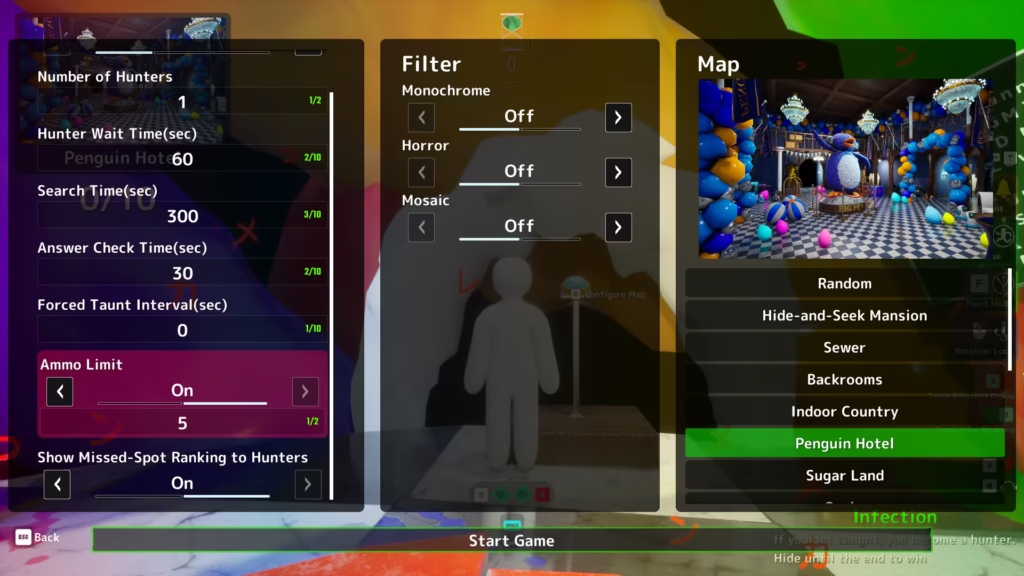
Only the lobby host can change this option. The host needs to open the lobby, press the blue button, and enter map configuration using the E key. The settings are shown in three columns, including hunter related options.
At the bottom of the list there is an Ammo Limit toggle that can be turned on or off using arrows. If enabled, the host can set a custom ammo value for hunters ranging from 1 to 99. This value is entered before the match starts, and the default value is 5.
When a hunter successfully hits a hiding player, their ammo is restored. This means that even with only 5 starting shots, accurate play allows them to effectively keep their ammunition.
However, every missed shot that hits an empty spot permanently consumes ammo. Once ammo runs out, hunters can no longer shoot, even if a target is right in front of them.
If all hunters run out of ammo, the hiding players automatically win the round to prevent unnecessary waiting and stalled matches.
The UI also displays remaining ammo at the bottom of the screen, so every shot needs to be used carefully.
As a Reminder, Xbox Players Found a Way to Get GTA 6 for Free Using Microsoft Rewards.


